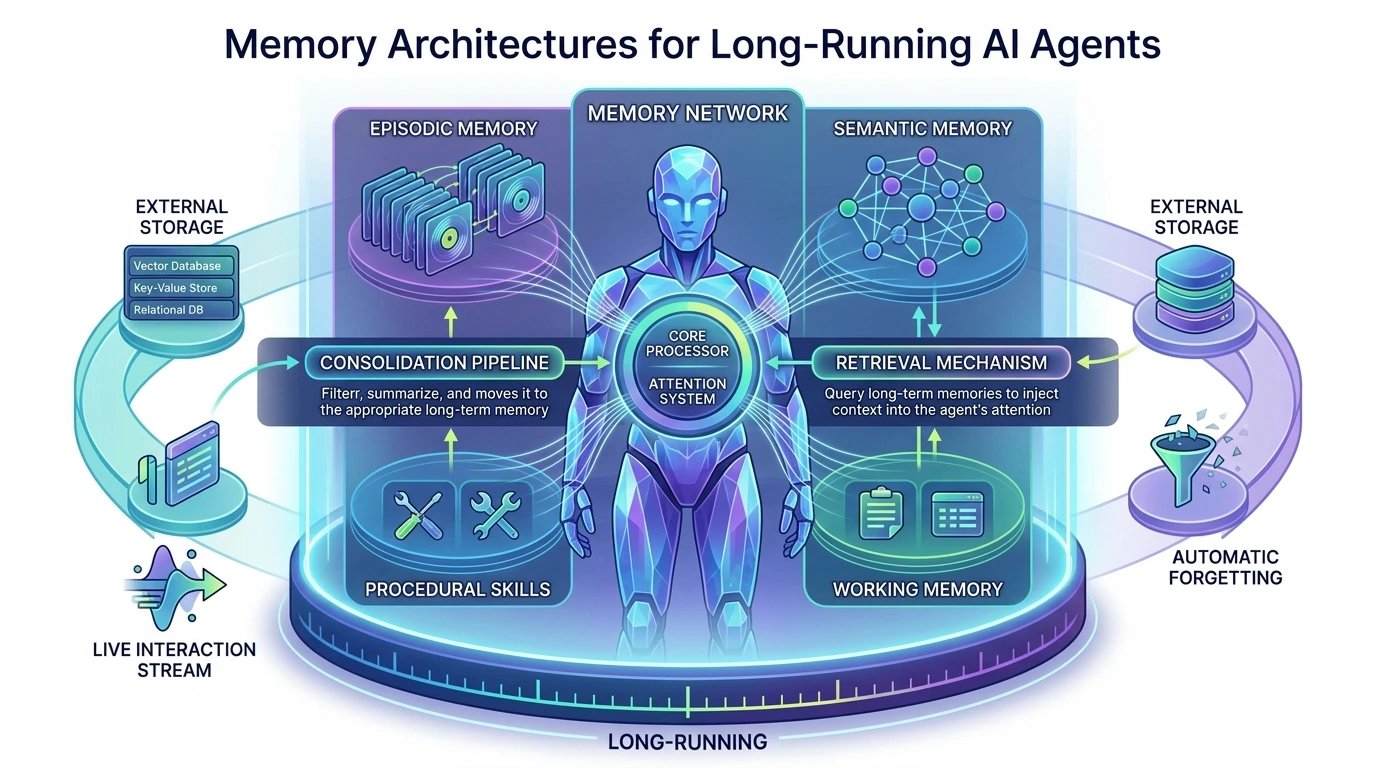
Long‑running AI agents — the ones that keep context across hours, days, or months — need memory systems that balance retrieval quality, cost, and correctness. This article focuses on practical choices: how to structure memory (vector stores, chunked databases, hybrid caches), how to apply retention and expiration policies, and what operational practices keep cost and technical risk under control.
What a production agent memory architecture must solve
Before picking storage or policies, clarify the functional constraints. A memory system must satisfy at least five things:
- Low-latency, relevant retrieval for prompts (so the agent can act without long waits).
- Durability and provenance, when you must audit decisions or comply with data policies.
- Controlled cost: storage, embedding/encoding compute, and retrieval calls add up.
- Scalable maintenance: indexes, re‑embedding after model updates, and pruning strategies.
- Correctness boundaries: avoid returning stale or private data by mistake.
Use the term agent memory architecture to mean the overall design that maps data types (utterances, tool results, documents, agent state) into storage tiers and retrieval strategies that meet those constraints.
Core architecture patterns
1) Vector store as primary retrieval layer
Vector stores (FAISS, Pinecone, Milvus, etc.) are the common choice when similarity search matters. They handle dense embeddings, enable semantic recall, and scale to large collections. Use cases: recalling user facts, retrieving related documents, surfacing prior agent actions.
Pros: fast semantic search, mature hosted options, straightforward RAG integration. Cons: storage grows with vectors; embedding costs for writes or reprocessing; vector drift when models change.
2) Chunked document DB + metadata index
Store original content in a document database (Postgres, MongoDB, object storage) split into semantic chunks with attached metadata (timestamps, source, agent task id). Keep vectors in a separate index referencing those chunks.
This pattern preserves provenance (raw text stays intact) and makes bulk operations easier—deleting, archiving, or re‑chunking without losing originals.
3) Hybrid caches (hot/warm/cold)
Combine in-memory or local caches for very recent interactions (hot), a vector store for warm retrievals, and cold archival storage for infrequent or long-term records. Hot caches speed immediate context building; cold storage keeps full audit trails cheaply.
Typical flow: agent writes to hot cache, background job batches and embeds items into the vector store, and nightly jobs move old items to cold archives.
4) Snapshotting for agent state
Some agents maintain complex internal state that must be restored deterministically (conversations, task graphs, internal variables). Snapshotting captures the agent’s full state periodically so the agent can resume without reconstructing from dispersed memory entries.
Snapshotting is complementary to vector stores and matters more for orchestration and correctness than for similarity search.
Retention and expiration policies that tame growth
Memory growth is the single biggest operational cost driver. Define retention with concrete, enforceable rules rather than vague notions like “keep important stuff.”
Policy primitives
- TTL (time-to-live): remove or archive items after a fixed age. Useful for ephemeral context; implement as agent memory TTL rules.
- Usage-based retention: retain items that are frequently retrieved or referenced by the agent.
- Importance flags: agents or humans can tag items as evergreen; these bypass automatic pruning.
- Summarization and compaction: replace many raw items with a compact summary that preserves intent but reduces storage.
- Soft delete vs hard purge: soft delete marks items hidden from retrieval but keeps them for audit; hard purge frees storage.
Vector store retention policies
Vector stores require particular attention: deleting vectors without removing the raw document breaks provenance. Use a coordinating system: keep canonical metadata in the document DB and store only IDs in the vector index. When a retention policy triggers, remove the ID from the vector index, then process the document DB row according to soft/hard delete rules.
Heuristics for pruning vectors:
- Prune the oldest X% of vectors per user when store size exceeds a threshold.
- Drop vectors that have not been retrieved in the past N days and have low semantic centrality (few neighbors).
- Replace clusters of similar vectors with a single summarized vector.
Practical TTL rules
Examples of agent memory TTL-style rules that map to real needs:
- Short session assistant: auto-expire dialogue turns after 7 days unless tagged important.
- Customer support agent: keep ticket history for 2 years for audits, but compact message logs older than 180 days into summaries.
- Personal agent: keep contact facts indefinitely, but expire routine logs after 90 days.
{
"default_ttl_days": 90,
"overrides": [
{"type": "conversation_turn", "ttl_days": 7},
{"type": "customer_ticket", "ttl_days": 730},
{"flag": "preserve", "ttl_days": null}
],
"actions": {
"on_expire": "soft_delete_then_archive",
"archive_after_days": 30
}
}
Cost drivers and how to manage them
Costs fall into predictable categories: storage, embedding and re-embedding compute, retrieval (requests/replica queries), and operational engineering time. Tactics to control each:
- Storage: tier older data into cheaper object storage; compress chunk contents; use summarized replacements.
- Embedding compute: batch embeddings and throttle writes; use smaller embedding models for lower-value items; lazy re-embedding only when retrieval degrades or after model changes.
- Retrieval load: add an application-level cache for common retrievals; tune similarity thresholds to return fewer vectors.
- Operational: automate pruning, snapshotting, and reindexing to avoid manual, expensive maintenance windows.
Estimate cost with a two-axis approach: per-user memory budget (average vectors and storage per active user) and system-level retention multiplier (how much historical data you keep). Run a small pilot to measure actual embed & query rates before committing to a large vector cluster.
Correctness, provenance, and safety
Memory errors — returning private or stale content — are often harder to fix than scaling issues. Build the following safeguards:
- Store canonical raw data and link vectors back to it. Never treat vectors as the single source of truth.
- Log retrievals and ranking decisions (which vectors were scored, their similarity scores, and why they were included in a prompt). This aids audits and debugging; it pairs well with observability practices for LLM apps.
- Implement filtering rules at retrieval time: redact or exclude content flagged sensitive or out-of-scope.
- Snapshot agent state to reproduce decisions. Snapshotting for agents helps when you need to replay a sequence of actions for debugging or compliance.
For teams using observability tooling, link retrieval traces to the broader prompt telemetry and model call traces — that makes it easier to answer “why did the agent respond like this?”
Choosing an architecture by use case
Match trade-offs to the agent’s purpose. Three pragmatic examples:
- Short-lived contextual assistants (session-based workflows): Use in-memory or local cache as the primary store. Persist only summaries or explicit user-saved notes. TTLs should be short (days).
- Customer-facing agents with audit needs: Use chunked DB + vector store, keep full raw records in cold archives, enable soft-deletes and long retention (months to years) for compliance, and snapshot state regularly for audits.
- Personal long‑term agents: Prioritize storage efficiency and summarization. Keep a small set of evergreen facts permanently but regularly compact logs into monthly summaries to control size and cost.
Implementation checklist
Before you ship, verify these items:
- Data model: raw content store + chunk metadata + vector index with stable IDs.
- Retention rules codified (TTL, usage thresholds, archival paths) and runnable as automated jobs.
- Soft-delete and purge processes that maintain vector/index consistency.
- Snapshotting schedule for agent state and a restore workflow that’s tested occasionally.
- Monitoring: vector store size, average query latency, retrieval hit-rate, and embedding queue length.
- Cost alerts when storage or query volumes exceed budgeted thresholds.
Common pitfalls and how to avoid them
Avoid these frequent mistakes:
- Keeping every interaction forever. Unbounded memory growth is the typical first failure mode.
- Deleting vectors without cleaning metadata. This creates dangling references and audit gaps.
- Re-embedding everything on every model upgrade. Prefer selective re-embedding based on usage signals.
- Relying solely on similarity score thresholds to decide relevance. Combine heuristics: recency, ownership, and agent task context.
Actionable next steps
- Map your data types (utterances, tool outputs, documents) to storage tiers and draft TTL rules for each type.
- Run a 30‑day pilot instrumented with usage and cost metrics to validate per-user memory budget assumptions.
- Automate background jobs for batching embeddings, pruning vectors, and snapshotting state; test restore and purge paths.
- Log retrieval decisions and link them to your prompt traces so you can answer correctness and compliance questions.
Memory architecture is a set of trade-offs: choose the pattern that aligns with your agent’s lifetime, auditability needs, and cost constraints, then automate retention and monitoring so those choices remain sustainable.
Frequently Asked Questions
How long should an agent keep memory by default?
There’s no one-size-fits-all answer. Use short TTLs (days) for ephemeral conversational turns, months for operational context, and multi-year retention for audit-sensitive records. Start with conservative defaults (e.g., 7–90 days) and extend by importance flags or usage signals.
Should vectors be re-embedded when I change embedding models?
Not automatically. Re-embed selectively: prioritize high-use items and critical data. Keep raw text linked to vectors so you can re-embed on demand or during scheduled maintenance windows.
What’s the simplest way to prevent memory growth from exploding?
Implement a two-tier TTL policy plus automated summarization: expire low-value items quickly, compact older content into summaries, and preserve only flagged important items indefinitely.
When should I snapshot agent state?
Snapshot after significant state changes (task completion, periodic checkpoints) and before maintenance windows. Test restores regularly to ensure snapshots are sufficient for reproducibility and audits.
How do I avoid returning private data from long-term memory?
Keep canonical raw data with metadata, filter retrievals by sensitivity flags, soft-delete private items promptly, and log retrievals for audits. Combine retention policies with runtime filters to block sensitive items.